Dbhub MCP Server
Token conscious database MCP server for Postgres, MySQL, SQL Server, Oracle, MariaDB, SQLite.
This grade comes from an automated MCPSafe scan of the server's JavaScript, TypeScript and Python source on 2026-10-02. It read the whole repository (168 files). It checks for leaked credentials, shell or code injection from function inputs, unsafe deserialization, malware signatures, install-time scripts, and weak password handling. It does not check for path traversal, server-side request forgery, prompt injection in tool descriptions, network exposure, SQL injection, cross-site scripting, or vulnerable dependencies. It has not been manually reviewed, and the code may have changed since the scan.
Excellent Security
Trust Score 71
Trust is stricter than security: it combines reviewed security, MCP capability risk, supply-chain metadata, quality, popularity, freshness, and penalties for unknowns.
- • No reviewed severe vulnerabilities published
- • Strong project quality signals
- • Good documentation surface
- • Solid supply-chain metadata
- • Stale or missing recent scan
- • MCP risk traits: Runs shell commands, Filesystem access, Network/API access
Security ScoreA+
Vulnerabilities Found
Quality ScoreB
Maintenance55
Popularity52
Documentation95
Available Documentation
Compatibility78
Features
Supported Transports
Vulnerabilities(0)
This grade comes from an automated scan. Individual findings from automated scans are not published.
READMEDbhub MCP Server
View source[!NOTE]
Brought to you by Bytebase, open-source database governance platform.
<p align="center">
<a href="https://www.star-history.com/bytebase/dbhub">
<picture>
<source media="(prefers-color-scheme: dark)" srcset="https://api.star-history.com/badge?repo=bytebase/dbhub&type=trending&theme=dark" />
<source media="(prefers-color-scheme: light)" srcset="https://api.star-history.com/badge?repo=bytebase/dbhub&type=trending" />
<img alt="GitHub Trending Repository of the Day" src="https://api.star-history.com/badge?repo=bytebase/dbhub&type=trending" />
</picture>
</a>
</p>
<p align="center">
<a href="https://dbhub.ai/" target="_blank">
<picture>
<source media="(prefers-color-scheme: dark)" srcset="https://raw.githubusercontent.com/bytebase/dbhub/main/docs/images/logo/full-dark.svg" width="75%">
<source media="(prefers-color-scheme: light)" srcset="https://raw.githubusercontent.com/bytebase/dbhub/main/docs/images/logo/full-light.svg" width="75%">
<img src="https://raw.githubusercontent.com/bytebase/dbhub/main/docs/images/logo/full-light.svg" width="75%" alt="DBHub Logo">
</picture>
</a>
</p>
            +------------------+    +--------------+    +------------------+
            |                  |    |              |    |                  |
            |                  |    |              |    |                  |
            |  Claude Desktop  +--->+              +--->+    PostgreSQL    |
            |                  |    |              |    |                  |
            |  Claude Code     +--->+              +--->+    SQL Server    |
            |                  |    |              |    |                  |
            |  Cursor          +--->+    DBHub     +--->+    SQLite        |
            |                  |    |              |    |                  |
            |  VS Code         +--->+              +--->+    MySQL         |
            |                  |    |              |    |                  |
            |  Copilot CLI     +--->+              +--->+    MariaDB       |
            |                  |    |              |    |                  |
            |                  |    |              |    |                  |
            +------------------+    +--------------+    +------------------+
                 MCP Clients           MCP Server             Databases
DBHub is a minimal MCP server: token-efficient, zero-dependency, and just two tools by default with opt-in extras. This lightweight gateway allows MCP-compatible clients to connect to and explore different databases:
- Minimal: Zero dependency, token efficient with a minimal set of MCP tools to maximize context window
- Multi-Database: PostgreSQL, MySQL, MariaDB, SQL Server, and SQLite through a single interface
- Multi-Connection: Connect to multiple databases simultaneously with TOML configuration
- Guardrails: Read-only mode, row limiting, and query timeout to prevent runaway operations
- Secure Access: SSH tunneling and SSL/TLS encryption
DBHub is the official example in the Claude Code docs for connecting to PostgreSQL via MCP.
Token Efficiency
DBHub loads just 2 tools by default at 1.4k tokens — 13-14x fewer than alternatives — keeping the context window open for your actual work.
| MCP Server | Default Config | Default Tools |
|------------|---------------|--------------|
| DBHub | 1.4k | 2 (execute_sql, search_objects) |
| MCP Toolbox | 19.0k | 28 |
| Supabase MCP | 19.3k | all |
Use Cases
- Local Development: Schema exploration, query validation, and data debugging with Claude Code, VS Code, Cursor, etc.
- Non-Technical Access: Expose curated, read-only views to non-technical staff via Claude Desktop, VS Code, Cursor, etc.
- Multi-Database Consolidation: Replace separate MCP servers for each database with a single DBHub process
- Production Troubleshooting: Read-only diagnostics with guardrails against runaway queries
Supported Databases
PostgreSQL, MySQL, SQL Server, MariaDB, and SQLite.
MCP Tools
DBHub implements MCP tools for database operations:
- **execute_sql**: Execute SQL queries with transaction support and safety controls
- **search_objects**: Search and explore database schemas, tables, columns, indexes, and procedures with progressive disclosure
- **explain_sql** (opt-in): Show a query's execution plan without running it
- **health_check** (opt-in): Report connection pool state and buffer cache hit ratio
- [Custom Tools](https://dbhub.ai/tools/custom-tools): Define reusable, parameterized SQL operations in your
dbhub.tomlconfiguration file
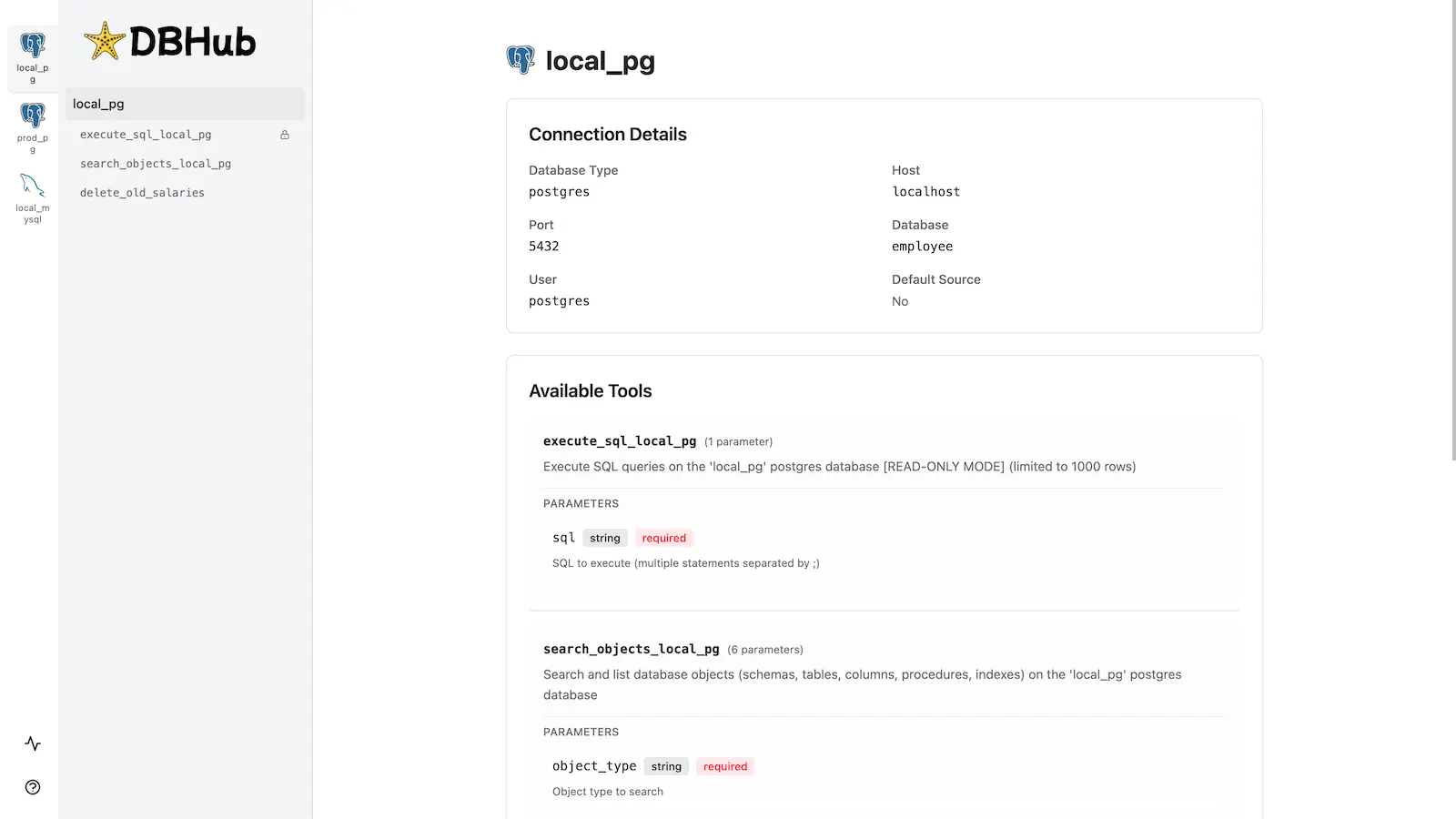
Workbench
DBHub includes a built-in web interface for interacting with your database tools. It provides a visual way to execute queries, run custom tools, and view request traces without requiring an MCP client.
Installation
npx @bytebase/dbhub@latest --transport http --port 8080 --dsn "postgres://user:password@localhost:5432/dbname?sslmode=disable"Also available as:
- Docker image
- MCP Bundle (one-click install, read-only)
- Claude Code plugin
See the Installation Guide for all options, Command-Line Options for parameters, and Multi-Database Configuration for connecting several databases at once.
Development
Requires Node.js >= 22.5.0 (DBHub uses the built-in node:sqlite module).
# Install dependencies
pnpm install

# Run in development mode
pnpm dev

# Build and run for production
pnpm build && pnpm start --transport stdio --dsn "postgres://user:password@localhost:5432/dbname"Contributors
<a href="https://github.com/bytebase/dbhub/graphs/contributors">
<img src="https://contrib.rocks/image?repo=bytebase/dbhub" />
</a>
Star History
<a href="https://www.star-history.com/?repos=bytebase%2Fdbhub&type=date&legend=top-left">
<picture>
<source media="(prefers-color-scheme: dark)" srcset="https://api.star-history.com/chart?repos=bytebase/dbhub&type=date&theme=dark&legend=top-left" />
<source media="(prefers-color-scheme: light)" srcset="https://api.star-history.com/chart?repos=bytebase/dbhub&type=date&legend=top-left" />
<img alt="Star History Chart" src="https://api.star-history.com/chart?repos=bytebase/dbhub&type=date&legend=top-left" />
</picture>
</a>
Embed Security Badge
Add this badge to your README or documentation

[](https://mcpsafe.org/registry/bytebase-dbhub)Server Information
- Source
- GITHUB
- Language
- typescript
- License
- MIT
- Transport
- STDIO
- Added
- Aug 11, 2026
- Updated
- Oct 1, 2026